
Toyota Tundra Key Fob Not Working: Quick Fixes and Troubleshooting
What’s in This Article
- Common Symptoms of a Tundra Key Fob Problem
- Most Likely Causes of a Tundra Key Fob Failure
- Quick Fixes First: Get Your Tundra Key Fob Working
- Replace the Tundra Key Fob Battery Step by Step
- Start Your Tundra When the Smart Key Battery Is Dead
- Clean and Inspect Battery Contacts and Internals
- Reprogram Your Tundra Key Fob When Your Model Allows It
- Test Interference From Electronics and LED Cargo Lights
- Diagnose Truck-Side Faults
- Diagnose a Faulty Key Fob
- Costs, Tools, and Next Steps
- Frequently Asked Questions
- Conclusion
- References
If your Toyota Tundra key fob stops working, do not assume the remote has failed. A weak coin battery, poor contact pressure, dirt, signal interference, or lost programming can cause the same problem.
Start with a careful step-by-step check before you pay for a new fob, locksmith visit, or dealer diagnostic. The right order can save time, money, and stress.
Key Takeaways
- Check the coin battery, polarity, and battery contacts before you replace the fob.
- Test the remote away from electronics because radio interference can reduce range.
- Compare your main fob with a spare fob to separate remote faults from truck faults.
- Use the programming method for your exact Tundra year, trim, and key type.
- Call a locksmith or dealer if all fobs fail or the truck shows receiver, immobilizer, or module faults.
Common Symptoms of a Tundra Key Fob Problem
A failing Toyota Tundra key fob can show more than one symptom. You may notice that lock, unlock, panic, or remote start works only sometimes.
The remote may work only close to the truck, or the dashboard may show a key warning on models with a Smart Key system. If all buttons fail at the same time, start with power, contact, and programming checks.
- The key fob does not lock or unlock the doors.
- The remote works only when you stand close to the truck.
- One button fails while the other buttons still work.
- The truck shows a key warning or fails to detect the Smart Key.
- Both the main fob and spare fob stop working.
Most Likely Causes of a Tundra Key Fob Failure
The most likely cause depends on how the problem started. A sudden failure after a battery change often points to wrong polarity, weak contact pressure, or the wrong battery size.
A slow loss of range often points to a weak battery, dirt on the contacts, or radio frequency interference. If more than one fob fails, focus on the truck-side receiver, wiring, fuse circuit, or control module.
- Battery issue: weak, dead, backward, loose, or wrong-size coin battery.
- Contact issue: bent tabs, dirt, corrosion, or low pressure inside the fob.
- Interference issue: nearby electronics, chargers, radio gear, or some aftermarket LED bulbs.
- Programming issue: lost sync, wrong programming steps, or model-specific key requirements.
- Truck-side issue: receiver, body control module, door lock circuit, fuse, or wiring fault.
Quick Fixes First: Get Your Tundra Key Fob Working
Start with the problems you can check in a few minutes. Confirm that the battery sits in the correct direction, with the positive and negative sides matching the markings inside the fob.
A new battery will not help if you install it backward or the metal contacts do not touch it firmly. Use a fresh battery from a sealed pack when possible.
Open the fob and look for dirt, moisture marks, loose parts, or corrosion. Clean light debris with a cotton swab and rubbing alcohol, then let the inside dry before you close the case.
Warning: Do not soak the fob or scrape the circuit board because excess liquid and hard tools can damage the remote.
Make sure the case snaps shut fully. A loose shell can reduce contact pressure and make the fob work only sometimes.
Test the fob in a low-interference area. Move away from phones, Wi-Fi routers, other key fobs, and strong LED lights.
Stand near the truck and press lock or unlock. If the fob works only at very close range, the battery may still be weak, the contacts may sit loose, or interference may reduce the signal.
If the fob stays unresponsive after a clean battery swap, check the owner’s manual for the correct programming method. Some Tundra models need a scan tool or dealer-level equipment.
If you have a spare working fob, test it before you buy parts. A spare fob can help you separate a bad remote from a truck-side receiver problem.
Replace the Tundra Key Fob Battery Step by Step
A weak or dead coin battery often makes a Toyota Tundra key fob stop locking, unlocking, or starting the truck. Use a quality replacement battery that matches the original battery type.
Check the old battery before you buy a replacement, because the correct size can vary by fob style and model year. Many Toyota fobs use a CR2032 battery, but your old battery and owner’s manual give you the safest match.
Note: Take a photo of the old battery before removal so you can match the size and polarity.
- Work on a clean surface. Use good light and keep small parts away from the edge of the table.
- Open the fob carefully. Use a small screwdriver or flat plastic tool along the seam. Apply steady pressure so you do not crack the case.
- Remove the old battery. Note which side faces up before you take it out.
- Install the new battery. Match the positive and negative markings inside the fob. Do not force the battery under the contacts.
- Check the contact points. The metal tabs should touch the battery firmly without bending too far.
- Close the case fully. Press the shell together until it snaps into place.
- Test the fob. Stand near the Tundra and try lock, unlock, panic, and remote start if your fob has those buttons.
If the fob works after the battery swap, test it again from a normal walking distance. Weak range after a new battery can point to dirty contacts, interference, internal fob damage, or a truck-side receiver issue.
Start Your Tundra When the Smart Key Battery Is Dead
Some Tundra models with a Smart Key system can still start when the fob battery runs down. Toyota support says holding the Smart Key next to the START button and pressing the button will often let the engine start.
Use this as a short-term workaround, not a repair. Replace the fob battery as soon as possible, then test the lock, unlock, and start functions again.
If the truck still does not detect the Smart Key after a fresh battery, check the spare fob. If both fobs fail, the issue may involve interference, the truck receiver, the immobilizer system, or a module fault.
Clean and Inspect Battery Contacts and Internals
If a fresh battery does not fix the problem, inspect the inside of the fob. Look closely at the battery tray, metal contacts, rubber buttons, and circuit board.
Dirt, moisture, old battery residue, or bent metal tabs can stop power from reaching the remote. Use a cotton swab lightly moistened with rubbing alcohol to clean the battery contacts.
Do not soak the fob. Too much liquid can damage the circuit board. If you see green or white corrosion, clean it gently and let the fob dry fully before reinstalling the battery.
Check whether the battery sits tightly. If a contact tab looks flat or pushed down, you can gently lift it with fine-tip tweezers.
Use very light pressure. If a tab breaks, the fob may need repair or replacement.
Check the buttons too. A worn rubber button pad or cracked plastic button can make one function fail while the rest still works.
If only one button fails, the switch under that button may have failed. In that case, battery replacement and reprogramming will not fix the button.
Reprogram Your Tundra Key Fob When Your Model Allows It
Your Tundra key fob may need programming if it stopped working after a battery change, works only sometimes, or shows a key warning on Smart Key models. Programming helps the fob and vehicle recognize each other again.
Before you start, gather every working key and fob you have. Some programming procedures can remove other keys if you skip steps or use the wrong procedure.
Check the owner’s manual or a trusted service source for your exact model year, trim, and key type. Toyota key systems vary across Tundra generations and trim levels.
If your model supports a manual programming sequence, follow the timing exactly. Sit in the driver seat, close the doors, and complete the lock, unlock, ignition, or button steps in the listed order.
Watch for door lock movement, dashboard messages, or security light behavior that confirms the fob entered programming mode. If the manual method fails, do not keep repeating random sequences.
Your Tundra may need a compatible on-board diagnostics II (OBD-II) programmer, Toyota Techstream, a qualified locksmith, or dealer service. After programming, test every key and fob before you leave the vehicle or service location.
[Products Worth Considering]

Do-It-Yourself Solution for Adding Remotes to your Vehicle Using this Kit

Vehicle-specific replacement or spare - this keyless entry transmitter looks and functions like the original fob on certain vehicle years, makes, models and configurations

Replacement: For keyless entry remote Car key FCC ID: GQ43VT20T, Part Numbers:89742-AE010, 89742-AE011, Frequnecy:315 Mhz
Test Interference From Electronics and LED Cargo Lights
Signal interference can make a working Tundra key fob seem weak or dead. Toyota owner resources note that strong radio signals and low batteries can affect Smart Key operation.
Toyota owner manual material also explains that the Smart Key system uses weak radio waves. That means nearby radio frequency noise can affect communication between the key and truck.
Start with a simple isolation test. Turn off nearby electronics and test the fob from several distances.
Move your phone away from the fob. Try the remote from different angles around the truck.
If the fob works better in one location than another, interference may play a role. Nearby phones, Wi-Fi routers, chargers, dash cameras, radio equipment, and some LED bulbs can create noise.
Some Tundra owners report key fob range problems after installing aftermarket LED bulbs near the cargo-light area. That report does not prove every LED cargo light causes a problem, so test before you replace parts.
If your problem started after an LED swap, turn the cargo light off and retest the remote. Then reinstall the original incandescent bulb or a known low-interference bulb and test again.
If performance improves after removing the LED bulb, avoid that bulb type or use a better electromagnetic interference (EMI) filtered option. If nothing changes, move on to fob condition, programming, receiver power, and wiring checks.
Pro tip: Test the fob before and after each accessory change so you can connect the failure to one part.
Diagnose Truck-Side Faults: Receiver, Modules, and Wiring
If the battery, contacts, interference checks, and programming do not solve the issue, the truck may have the fault. This becomes more likely when more than one fob fails at the same time.
First, test a known-good spare fob if you have one. If the spare works normally, your main fob likely has a battery, contact, button, programming, or internal circuit problem.
If no fob works, the receiver system, power locks, body control module, wiring, or related fuse circuit may need inspection. A scan tool can help check for body control, keyless entry, immobilizer, or door lock fault codes.
Record any codes before clearing them. A code can point the diagnostic process in the right direction and prevent unnecessary fob replacement.
Inspect visible wiring and connectors only if you can do it safely. Look for corrosion, loose plugs, damaged harnesses, or water intrusion.
Use a multimeter to check power and ground only if you understand the circuit. If the receiver or body control system does not communicate, a qualified technician or locksmith can test the system more safely.
Diagnose a Faulty Key Fob: Repair vs Replace?
Replace the battery and clean the contacts before you decide the fob has failed. Many fobs stop working because of simple power or contact issues.
If the remote still does not work, check for physical damage. A cracked case, missing button, water damage, worn switch, or loose battery clip can make replacement the better choice.
If only one button fails, a repair may work. If several buttons fail or the fob has water damage, replacement usually makes more sense.
Use this basic troubleshooting order before you buy a new fob:
| Step | Action | What It Tells You |
|---|---|---|
| 1 | Check battery and contacts | Confirms basic power delivery |
| 2 | Test away from interference | Checks for signal range problems |
| 3 | Program per manual or scan tool | Restores lost synchronization when supported |
| 4 | Compare with a spare fob | Separates fob faults from truck faults |
| 5 | Inspect internal damage | Helps decide repair vs replacement |
[Products Worth Considering]

**Please confirm compatibility using the fitment guide located in the product images**

KEY FOB BATTERY INSTALLATION: This kit includes [qty 2] CR2016 batteries for an easy and secure replacement of your key fob battery for Toyota vehicles.

CONFIRM FIT **Please confirm compatibility using the fitment guide located in the product images** This battery will only fit your key fob if it exactly matches one of the examples in the compatibility guide.
Costs, Tools, and Next Steps: DIY, Locksmith, or Dealer
The best next step depends on the cause. A battery issue is a simple do-it-yourself fix.
A programming issue may require a compatible OBD-II programmer, locksmith, or dealer. A truck-side receiver or wiring issue may need diagnostic equipment.
You can save money by handling simple repairs yourself, but key programming can become model-specific. If you do not have a working master key, the right programmer, or the correct instructions for your Tundra, call a locksmith or dealer before buying parts.
[Products Worth Considering]

**Please confirm compatibility using the fitment guide located in the product images** Your key fob must have a silver Toyota logo on the front and be model year 2021 or newer
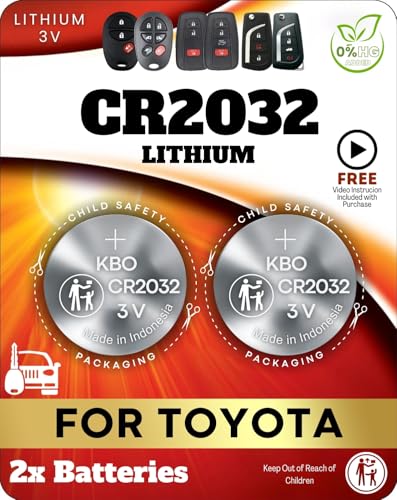
Reliable Power Solution – Includes two premium CR2032 lithium batteries, ensuring long-lasting and dependable power for your Toyota key fob.
DIY Costs and Tools
Basic DIY checks need only a few tools. A replacement coin battery, small screwdriver, cotton swabs, rubbing alcohol, and a multimeter can help you solve many key fob problems at home.
- Small screwdriver: opens the fob case for battery replacement.
- Rubbing alcohol and cotton swab: cleans light dirt or corrosion from contacts.
- Multimeter: confirms whether the battery has usable voltage.
- OBD-II programmer or scan tool: helps with programming or diagnostics on supported models.
Start with the lowest-cost checks first. Replace the battery, clean the contacts, test range, and compare with a spare fob.
If several fobs fail, stop replacing remotes and focus on the truck-side system.
Locksmith vs Dealer
A locksmith often works well for replacement fobs, key cutting, and many programming jobs. A dealer may help more when the issue involves warranty coverage, proprietary equipment, Smart Key systems, immobilizer faults, or module diagnostics.
| Option | Typical Cost Level | Best For |
|---|---|---|
| DIY | Lowest | Battery replacement, cleaning, simple programming attempts |
| Locksmith | Moderate | Replacement fobs, key cutting, many programming jobs |
| Dealer | Highest | Smart fobs, warranty issues, module diagnostics, complex programming |
Get quotes before you choose. Ask whether the price includes the fob, emergency key cutting, programming, and testing all remote functions.
Frequently Asked Questions
Why Is My Toyota Tundra Key Fob Not Unlocking?
Your Toyota Tundra key fob may not unlock because of a weak battery, wrong battery polarity, dirty contacts, worn buttons, signal interference, lost programming, or a truck-side receiver problem. Start with the battery and contact checks first. Then test a spare fob if you have one.
How Do I Resync My Toyota Key Fob?
Use the programming method listed for your exact Tundra model year and key type. Some models support a manual sequence, while others need a compatible scan tool, locksmith equipment, or dealer service. Gather all working keys before programming so none get removed by mistake.
Can a New Key Fob Battery Still Fail?
Yes. A new battery can fail if it has the wrong size, sits backward, lost charge in storage, or does not touch the contacts firmly. Test the battery with a multimeter if possible, and check the metal tabs before you blame the remote.
Why Does My Tundra Key Fob Only Work Close to the Truck?
Short range often points to a weak battery, dirty contacts, loose battery pressure, internal fob damage, or radio interference. Test the fob away from electronics and aftermarket LED lights. If the range stays poor with more than one fob, check the truck-side receiver system.
Can I Drive If My Tundra Smart Key Battery Dies?
Many Toyota Smart Key models can still start when you hold the fob near the START button and press it. Treat this as an emergency step. Replace the fob battery soon so the truck can detect the key normally.
Conclusion
A Toyota Tundra key fob problem is easiest to fix when you follow a clear order. Start with the battery, polarity, contacts, case fit, and signal interference.
Then use the correct programming method for your model year. If the fob still does not work, compare it with a spare remote.
One bad fob points toward repair or replacement. Multiple failed fobs point toward the truck’s receiver, wiring, locks, or control module.
Document each test, get quotes when needed, and choose DIY, locksmith, or dealer service based on the fault you find. A careful process helps you fix the real cause instead of buying parts you do not need.
References
- 2023 Toyota Tundra Hybrid Owner’s Manual, Smart Key System – Toyota Owners, 2023
- If the Battery in the Smart Key Dies – Toyota Support
- How Do I Operate the Smart Key Locking and Unlocking Functions? – Toyota Support
- Interference With Radio, TV and Cordless Telephone Signals – Federal Communications Commission, 2020
- Diagnosing Radio Frequency Interference Symptoms – Mighty Auto Parts, 2022
- Wireless Remote Control and Electronic Key Battery Replacement – Toyota Owners, 2021

[…] What Is the Max Hitch Weight for a Toyota Tundra? […]