
Toyota Camry Dynamic Radar Cruise Control (DRCC) is Toyota’s adaptive cruise system for highway use. It can hold a set speed. It can also adjust acceleration or braking to help maintain a selected gap from a detected vehicle ahead. The 2026 U.S.-market Camry uses Toyota Safety Sense 3.0 with Full-Speed Range DRCC. Toyota says you select the set speed above 20 mph. The full-speed system is separately described as operating from 0–110 mph when its conditions are met. Those are different limits. You must still steer, watch traffic, and brake or override the system whenever needed.
Last updated: September 1, 2026
Method: This guide was rechecked against Toyota’s current Toyota Safety Sense 3.0 information and 2026 Camry feature information. We also checked model-year Camry owner-manual guidance and NHTSA’s driver-assistance definitions. Use the owner’s manual for your exact model year and software version as the final authority.
Affiliate disclosure: As an Amazon Associate, AutoReviewNest earns from qualifying purchases. This does not affect our editorial independence or the price you pay.
Quick Answer
On the 2026 U.S.-market Camry, Full-Speed Range Dynamic Radar Cruise Control is intended for highway use. Toyota says you select the set speed above 20 mph, while the Full-Speed Range system itself is designed to function from 0–110 mph. It can adjust speed to help maintain the selected gap and can follow a detected vehicle to a stop under certain conditions. Stop-hold and resume behavior still depends on the model year, equipment, operating conditions, and software instructions.
Key Takeaways
- DRCC is Toyota’s adaptive cruise control system. It adjusts speed to help maintain a selected gap from traffic ahead.
- The 2026 U.S. Camry uses Toyota Safety Sense 3.0 with Full-Speed Range DRCC; the set-speed threshold and the system’s low-speed operating range are different specifications.
- Toyota Safety Sense 3.0 updated DRCC from three to four cruise-distance settings. Older Camry systems may therefore show a different number of choices.
- Use DRCC mainly on highways and expressways, not on city streets, sharp curves, slippery roads, or in poor visibility.
- The driver remains responsible for steering, braking, watching traffic, and taking over whenever needed.
At a Glance
| Time Required | A few minutes to identify the controls while parked; seconds to set once familiar |
| Difficulty | Easy |
| Tools Needed | None |
| Cost | No separate operating cost when equipped; availability varies by model year and market |
Which DRCC Version Does Your Camry Have?
Model year matters because Toyota changed both the controls and the following-distance choices over time. The 2025–2026 U.S.-market Camry uses Toyota Safety Sense 3.0 with Full-Speed Range DRCC. Toyota’s TSS 3.0 overview says this generation updated cruise-distance selection from three settings to four. Earlier Camry versions can use different controls, set-speed thresholds, and low-speed behavior.
| Camry Version | DRCC Detail | What You Should Do |
|---|---|---|
| 2025–2026 U.S. Camry | Toyota Safety Sense 3.0 with Full-Speed Range DRCC and four cruise-distance settings | Use the steering-wheel driving-assist controls and current display prompts shown in the model-year manual |
| Older Camry model years | Earlier DRCC versions may have different controls, operating thresholds, and three distance settings | Do not apply newer button steps automatically; check the manual for the exact year |
How Do You Activate DRCC in a Toyota Camry?
Activate DRCC only after you reach a suitable highway or expressway with clear traffic flow. Before driving, identify the DRCC controls while parked. On newer TSS 3.0 Camrys, these include the driving-assist mode selector, driving-assist switch, +/RES, minus, cancel, and vehicle-to-vehicle distance controls. Older layouts can differ.
- Select DRCC. Use the cruise-control or driving-assist controls shown in your owner’s manual. On newer TSS 3.0 Camrys, select Dynamic Radar Cruise Control with the driving-assist mode control and confirm the DRCC indicator appears.
- Reach your preferred speed. Keep the speed legal and appropriate for traffic, visibility, and road conditions.
- Set the speed. On the 2026 Camry, select a set speed above 20 mph, then use the set/driving-assist control shown for your model and confirm the set speed in the Multi-Information Display.
- Select a following gap. Use the vehicle-to-vehicle distance control. TSS 3.0 provides four cruise-distance settings; some older Camry systems provide three.
- Keep monitoring traffic. Steer normally and stay ready to brake, cancel, or change the set speed.
Toyota describes TSS 3.0 DRCC as being designed to be set above 20 mph. Toyota separately describes the 2026 Camry’s Full-Speed Range DRCC as functioning from 0–110 mph. In other words, “full-speed range” does not mean you can select a new set speed at 0 mph. Earlier DRCC versions may use different thresholds, so check the instructions for your exact model year on Toyota’s official Camry manuals page.
Note: Newer TSS 3.0 Camrys use steering-wheel driving-assist controls, while some older Camrys use a different button layout or cruise-control stalk. Follow the labels and display prompts in your vehicle rather than assuming every Camry works the same way.
To change the set speed, use the plus/resume and minus controls shown for your model. To cancel DRCC, press the cancel control, press the brake pedal, or turn cruise control off. If Full-Speed Range DRCC stops the Camry behind a detected vehicle, follow the Multi-Information Display prompt before resuming. Depending on the model and conditions, follow-up cruising may resume after you press RES or the accelerator. Equipped Traffic Jam Assist can have separate extended-resume behavior. Do not assume those features work the same way on every Camry.
Which DRCC Following Distance Should You Use?
DRCC lets you select the following gap between your Camry and a detected vehicle ahead. Toyota Safety Sense 3.0 changed the system from three cruise-distance settings to four. For reference, the 2025 Camry TSS 3.0 manual labels them Short, Medium, Long, and Extra long. Older Camrys may show only three choices. The actual gap is not fixed because it changes with vehicle speed and operating conditions.
Start with a longer setting while learning how your Camry responds. Do not treat a larger selected gap as permission to keep DRCC on when visibility, traction, or road conditions become unsuitable. If rain becomes heavy, visibility drops, standing water appears, or traction worsens, cancel DRCC and drive manually.
| Follow Distance | 2025 Camry Manual Reference at 60 mph | What to Know |
|---|---|---|
| Extra long | Approximately 200 ft (60 m) | Largest of the four TSS 3.0 settings in the 2025 Camry manual |
| Long | Approximately 145 ft (45 m) | A larger buffer for clear highway driving |
| Medium | Approximately 100 ft (30 m) | A middle setting for steady traffic |
| Short | Approximately 85 ft (25 m) | Smallest of the four TSS 3.0 settings; stay ready for cut-ins and sudden changes |
Those distances are a 2025 Camry manual reference at 60 mph. They are not fixed following distances. They also do not guarantee that every software version will display the same values. The 2026 U.S. Camry also uses TSS 3.0, but its current owner’s manual and Multi-Information Display remain the final authority for your vehicle.
Pro Tip: If drivers repeatedly cut into the selected gap, do not shorten it to block them. Increase space, stay alert, and switch to manual speed control if traffic becomes unpredictable.
[Products Worth Considering]

[Vehicle Fitment]: Compatible with Toyota Yaris 2007-2009, Venza 2009 & 2014-2015, Tundra 2005-2010 & 2014-2021, Tacoma 2005-2009 & 2014-2023, Solara 2004-2008, Sienna 2004-2010 & 2013-2015, RAV4 2004-2009, Prius 2004-2022, Matrix 2009-2010, Land Cruiser 2003-2009 & 2014-2021, Highlander 2005-2009, FJ Cruiser 2007-2009, Corolla 2009-2010 & 2014-2016, Camry 2005-2010 & 2014-2017, Avalon 2005-2013, 4Runner 2003-2009 & 2014-2019 --- without Adaptive Cruise Control & Collision Mitigation Braking
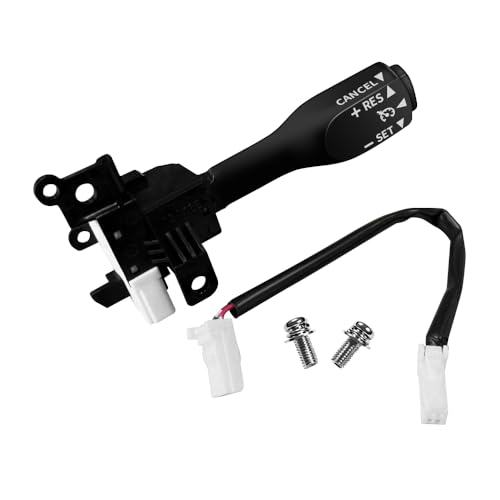
Note: This cruise control is for replacement only and Do Not fit 1.6L Toyota Corolla and Do Not fit all manual transmission cars!!!. Please make sure your original car has cruise control function and check your original part number, Reference Part Number: 84632-34017, 84632-08020, 84632-08021, 84632-0F010, 84632-34010, 84632-34011. If your original car is a hybrid, you need to use the original car wiring harness!!!

Applicable for Lexus CT200h (2011-2017), ES330 (2005-2006), ES350 (2007-2012), GS300 (2006), GS350 (2007-2011), GS430 (2005-2007), GS450h (2007-2011), GS460 (2008-2011), GX460 (2010-2019), GX470 (2003-2009), HS250h (2010-2012), IS F (2008-2014), IS250 (2006-2015), IS350 (2006-2015), LX470 (2001-2007), LX570 (2008-2021), RX330 (2004-2006), RX350 (2007-2015), RX400h (2006-2008), RX450h (2010-2015), iM (2016), tC (2005-2015), xB (2008-2015), xD (2008-2014)
What Conditions Can Reduce DRCC Performance?
DRCC works best on clear highways with predictable traffic and clean sensors. Toyota warns that driver-assistance systems have recognition and control limits. The system may not detect every vehicle, object, or road situation correctly. Keep the front radar sensor cover and front camera area clean. Follow any warning shown in the vehicle display.
Several conditions can reduce DRCC performance:
- Dirty or blocked sensors: Mud, snow, ice, bugs, stickers, accessories, or water droplets can interfere with the radar sensor or camera.
- Poor visibility: Heavy rain, fog, snow, glare, darkness, or road spray can make detection less reliable.
- Curves and hills: On sharp curves, steep grades, or roads where traffic is not directly ahead, DRCC may react late or unexpectedly.
- Sudden cut-ins: The system may need time to recognize a vehicle that moves abruptly into your lane.
- Small or unusual targets: Motorcycles, narrow vehicles, trailers, unusual loads, or stopped objects may be harder to detect.
- Low-traction roads: Ice, snow, gravel, standing water, or uneven traction can make automated speed changes unsafe.
Warning: DRCC is not a substitute for braking or watching traffic. If traffic slows suddenly, a vehicle cuts in, or road conditions become unsafe, brake and take control immediately.
How Can You Use Camry DRCC Safely?
Safe DRCC use depends more on choosing the right conditions than on pressing the right button. The system can reduce repeated accelerator and brake input, but it cannot judge every hazard or replace your attention.
| Tip | Why It Matters |
|---|---|
| Use it mainly on highways | DRCC is designed for steady roads, not complex city driving. |
| Keep sensors clean | A blocked radar sensor or camera can reduce detection. |
| Use a larger gap in clear but changing traffic | More space gives you additional time to react to speed changes. |
| Watch for cut-ins and stopped traffic | A sudden lane change or stopped vehicle may require immediate manual braking. |
| Know how to cancel quickly | Press the brake, cancel control, or cruise switch when conditions change. |
| Turn it off on slick or low-visibility roads | Reduced traction or sensor visibility can limit safe system operation. |
Before a long trip, inspect the front radar sensor cover and windshield camera area identified in your owner’s manual. Remove dirt, bugs, frost, and snow with a soft cloth. If a warning remains after the areas are clean and conditions improve, arrange a qualified inspection.
DRCC can reduce the workload of steady highway driving. The driver still remains responsible for speed, steering, braking, and watching the road.
How Is DRCC Different From Regular Cruise Control?
Regular cruise control holds one set speed until you brake, cancel it, or adjust it. Dynamic Radar Cruise Control is adaptive. It can reduce the Camry’s speed when it detects slower traffic ahead. When the lane clears, it can accelerate toward the set speed.
On newer Camrys, conventional cruise control may use the driving-assist mode controls. Some older systems use a stalk or a hold-button procedure instead. Use the switching method shown in the owner’s manual for your exact model year. Do not apply an older shortcut to a newer car.
[Products Worth Considering]

OEM Number: 84632-34011. Manufacturer Part Number: 84632-34011/84632-08021/84632-34017

【Direct Replacement】 – Fits OEM part numbers 84632-34011, 84632-34017, 8463234011, 8463234017, ensuring seamless compatibility with multiple Lexus, Scion, and Toyota models.
Key Features Comparison
| Feature | Regular Cruise Control | Dynamic Radar Cruise Control |
|---|---|---|
| Maintains set speed | Yes | Yes |
| Adjusts for traffic ahead | No | Yes, when a vehicle is detected |
| Selectable following distance | No | Yes |
| Can slow the vehicle automatically | No | Yes, within system limits |
| Can follow traffic to a stop | No | On equipped Full-Speed Range DRCC systems, under certain conditions |
Driving Experience Differences
With regular cruise control, you must cancel or brake whenever traffic slows. DRCC can manage routine speed changes while a detected lead vehicle remains within its operating range. This can reduce repeated pedal input during steady highway travel.
DRCC may still brake later or accelerate differently than you expect. It can also lose track of traffic outside its detection limits. Treat every speed change as assistance, not as a decision you can ignore.
Safety and Convenience Factors
DRCC is a driver-assistance feature, not collision avoidance or self-driving technology. The National Highway Traffic Safety Administration places adaptive cruise control under driver assistance for acceleration and braking. The driver remains fully engaged and responsible.
- Convenience: Reduces repeated speed adjustments during long highway drives.
- Comfort: Helps maintain a steadier selected gap in flowing traffic.
- Awareness: Requires you to monitor lane changes, road conditions, stopped traffic, and warning messages.
- Control: Requires you to steer, brake, and override the system whenever needed.
Why Is Camry DRCC Unavailable or Not Working?
If DRCC will not set or a “Radar Cruise Control Unavailable” message appears, start with the display instructions. Then check the visible sensor areas. A blocked radar sensor or camera can temporarily disable the feature. Poor weather, low traction, an unmet operating condition, or a system fault can also make DRCC unavailable.
| Issue | Likely Cause | What to Do |
|---|---|---|
| DRCC will not set | Speed, gear position, road conditions, or system status may not meet the requirements | Read the display message and check the owner’s manual for your model year |
| “Radar Cruise Control Unavailable” appears | The radar sensor, sensor cover, or front camera may be blocked | Park safely, clean the identified sensor areas, and try again after conditions improve |
| System cancels by itself | Brake input, low traction, poor visibility, or another operating limit | Drive manually until the road and weather are suitable |
| Camry follows too closely | The selected gap is too short for the traffic conditions | Increase the following-distance setting or switch to manual control |
| Braking feels abrupt | Traffic is changing quickly, a vehicle cut in, or detection changed | Brake manually, increase the gap, and reassess whether DRCC is suitable |
| The warning remains after cleaning | Calibration, sensor damage, wiring, or another malfunction may be involved | Arrange inspection by a Toyota dealer or qualified repair facility |
If the windshield, bumper, grille, radar sensor, or front camera area has been repaired or replaced, the system may need inspection. It may also need calibration. Do not ignore repeated DRCC warnings after a collision, windshield replacement, or front-end repair.
[Products Worth Considering]
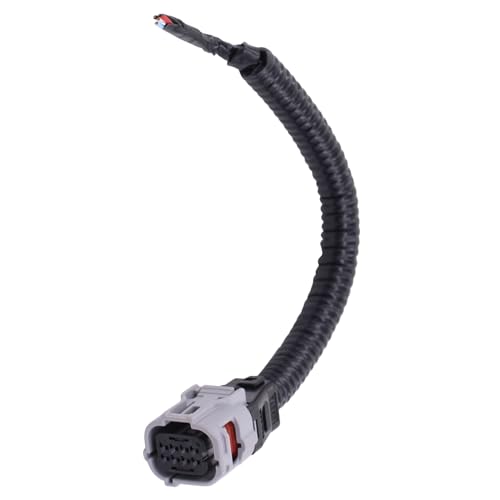
Compatible with Toyota Avalon 2013-2022; Camry 2018-2022; CHR 2017-2019;

【Fitment 1】Compatible with Toyota Camry 1994-2006 3.0L V6, Camry 2002-2009 2.4L L4, Camry 2004-2006 3.3L V6, Corolla 2009-2010 2.4L L4, RAV4 2006-2012 3.5L V6, Highlander 2001-2007 2.4L L4, Highlander 2001-2003 3.0L V6, Highlander 2004-2007 3.3L V6, Highlander 2008-2013 3.5L V6, Avalon 1995-2004 3.0L V6, Avalon 2005-2007 3.5L V6

Replaces Part Number: 83181-12040, 83181 12040, 8318112040
When Should You Keep DRCC On or Switch to Manual Driving?

Use this decision guide when traffic or road conditions change. DRCC is most useful when the road is simple and traffic behavior is predictable.
| Driving Situation | Best Choice | Reason |
|---|---|---|
| Open highway with clear visibility | DRCC can remain on | The system has a clear lead-vehicle path and fewer sudden conflicts |
| Rolling highway traffic with occasional speed changes | DRCC with a medium or long gap | The system can manage routine speed changes while you monitor cut-ins |
| Frequent cut-ins or abrupt braking | Switch to manual driving | Human judgment may be needed faster than the system can respond |
| Heavy rain, fog, snow, ice, or standing water | Switch to manual driving | Visibility, sensor performance, and tire traction may be reduced |
| Construction, toll areas, ramps, or city streets | Switch to manual driving | These areas require frequent judgment about lanes, signs, people, and merging traffic |
What Happens When Traffic Slows or Clears?
When DRCC detects slower traffic ahead, it can reduce speed to help maintain the selected gap. When the lane clears, it can accelerate back toward the set speed. Keep your foot ready because the system may not respond to every stopped object, cut-in, or sudden traffic change.
How Does the Distance Setting Change the Experience?
On TSS 3.0 Camrys, Extra long is the largest of four available distance settings, followed by Long, Medium, and Short. A longer setting gives more space, but the actual distance still changes with speed. The Short setting provides the smallest selected gap and should never be used to discourage other drivers from merging.
How Does DRCC Work With Other Toyota Safety Sense Features?
On the 2026 U.S. Camry, Toyota Safety Sense 3.0 includes DRCC with other driver-assistance features. Lane Tracing Assist can provide steering support when its operating conditions are met. It works while DRCC is active. DRCC itself controls speed and following distance, not normal steering. Traffic Jam Assist, if equipped, is a separate feature. It has its own conditions and resume behavior. None of these features turns DRCC into hands-free or self-driving technology.
When Should You Not Use DRCC?
Manual driving is safer when road, traffic, or visibility conditions demand frequent judgment. Turn DRCC off in these situations:
- City streets with traffic lights, pedestrians, cyclists, and frequent turns
- Construction zones with unclear lanes, cones, or changing traffic patterns
- Sharp curves, mountain roads, steep grades, or winding roads
- Heavy rain, snow, fog, ice, road spray, or standing water
- Slippery surfaces such as gravel, snow, ice, or wet leaves
- Heavy traffic with frequent cut-ins or abrupt braking
- Roads with poor lane structure or confusing merges
- Parking lots, driveways, ramps, toll areas, or service areas
Warning: If the Camry is approaching stopped traffic and you are unsure whether DRCC has detected it, brake immediately. Never wait to see what the system does.
Frequently Asked Questions
How does DRCC differ from regular cruise control?
Regular cruise control holds a set speed until you cancel it, brake, or adjust it. DRCC can also reduce speed when it detects slower traffic ahead, then accelerate toward the set speed when the lane clears.
What is the difference between radar cruise control and adaptive cruise control?
Adaptive cruise control is the general feature category. Dynamic Radar Cruise Control is Toyota’s name for its radar- and camera-supported adaptive cruise control system.
What is Dynamic Radar Cruise Control?
Dynamic Radar Cruise Control is a Toyota driver-assistance feature that helps maintain a preset speed and selected following gap. It can adjust acceleration and braking when it detects a vehicle ahead, but the driver must continue steering and monitoring traffic.
How many DRCC following-distance settings does a 2026 Toyota Camry have?
The 2026 Camry uses Toyota Safety Sense 3.0. Toyota says TSS 3.0 updated DRCC from three cruise-distance settings to four. Older Camrys may have three settings, so use the display and owner’s manual for your exact model year.
Can Toyota Camry DRCC stop the car?
Full-Speed Range DRCC can help follow a detected vehicle to a stop under certain conditions. Stop-hold and resume behavior can differ by model year and software version. Follow the display prompt and your owner’s manual.
Why is my Camry DRCC unavailable?
DRCC may be unavailable if a radar sensor or camera is blocked. Poor weather, low traction, an unmet operating condition, or a system fault can also disable it. Park safely, read the display message, clean the identified sensor areas, and try again when conditions improve.
Is DRCC safe to use in rain?
Rain can reduce sensor performance and tire grip. Follow your owner’s manual and stay ready to cancel DRCC. Turn it off if visibility, road spray, standing water, or traction becomes a concern.
Does DRCC steer the Toyota Camry?
DRCC controls speed and following distance, not normal steering. On equipped models, Lane Tracing Assist may provide steering support while DRCC is active. The driver must still remain attentive and use the steering wheel as required.
Where are the Camry DRCC sensors?
Toyota Safety Sense uses a front radar sensor and a front camera. The exact covers and locations can vary by model year. Use the diagrams in your owner’s manual before cleaning or inspecting them.
Conclusion
Toyota Camry Dynamic Radar Cruise Control is most useful on clear highways with predictable traffic. On the 2026 U.S. Camry, remember two details. Toyota describes the set speed as above 20 mph, while Full-Speed Range DRCC is designed to function from 0–110 mph. TSS 3.0 also uses four cruise-distance settings rather than the three found on some older systems. Keep the sensor areas clean and choose a suitable gap. Switch to manual driving when visibility, traction, road layout, or traffic behavior becomes uncertain. Before your first trip, review the DRCC controls and warning messages in the owner’s manual for your exact Camry model year.
Sources
- Toyota Safety Sense: Toyota’s official overview of TSS 3.0 DRCC, set-speed guidance, cruise-distance settings, and driver-assistance limitations.
- Toyota Camry Owner’s Manuals and Warranties: official manuals for checking exact Camry model-year controls and operating requirements.
- 2026 Toyota Camry eBrochure: official Camry feature information, including Full-Speed Range Dynamic Radar Cruise Control.
- 2026 Toyota Camry Driving Support Systems Manual Excerpt: official Toyota Safety Sense and driver-assistance precautions.
- Toyota Support: Adaptive Cruise Control Operation: Toyota support guidance on vehicle-to-vehicle distance and radar range controls.
- NHTSA Driver Assistance Technologies: federal safety context for understanding driver-assistance features and limitations.

[…] Watch for the blue lines that confirm LTA is providing input. The system pairs well with Full Speed Dynamic Radar Cruise Control on highways and through curves, but the moment your hands leave the wheel, it shuts off. Stay […]